Payroll that gets Ghana right.
PAYE and SSNIT computed from the published rules and pinned to every run, so last year’s payslips still reconcile to last year’s law.
14 days free. No card. Your data stays yours if you leave.
Employee takes home
2,459.27
18.0% of basic goes to PAYE and SSNIT, at a top rate of 17.5%.
- Basic
- 3,000.00
- SSNIT 5.5%
- −165.00
- Chargeable
- 2,835.00
| Chargeable income | Rate | Charged on | Tax |
|---|---|---|---|
| First 588.00 | 0% | 588.00 | 0.00 |
| Next 80.00 | 5% | 80.00 | 4.00 |
| Next 100.00 | 10% | 100.00 | 10.00 |
| Next 2,900.00Your band | 17.5% | 2,067.00 | 361.73 |
| Next 16,000.00 | 25% | — | — |
| Next 30,332.00 | 30% | — | — |
| Exceeding 50,000.00 | 35% | — | — |
| PAYE due this month | 375.73 | ||
Costs the employer
Basic plus employer SSNIT at 13%: Tier 1 GH₵ 405.00, Tier 2 GH₵ 150.00.
GH₵ 3,390.00
SSNIT
5.5 / 13%
Employee / employer share
Insurable ceiling
GH₵ 69,000.00
Monthly maximum, 2026
Top PAYE rate
35%
Above GH₵ 50,000.00 a month
Minimum wage
GH₵ 21.77
Per day, 2026
Sources: GRA, Pay As You Earn under Act 1178 · SSNIT, Maximum and minimum insurable earnings for 2026 (14 January 2026) · National Tripartite Committee, 2026 minimum wage. Every figure, with its source

Ghana
Built for the businesses that keep Ghana running.
Freight and logistics, manufacturing, retail chains, schools, clinics, hospitality. Companies with five to a hundred and fifty people on the payroll, where the person running it has four other jobs and the PAYE table open in another window.
Approved payroll keeps the rules it was run under.
Every version of Ghana's statutory rules Payro has shipped stays on record, each with the date it took effect. A run carries its version forever, so last year's payslips still reconcile to last year's law.
Currently applying GH-2026.2, published from the admin area and immutable once live.
GH-2026.1
Closed1 January 2026 — 31 August 2026
Act 1094 bands; SSNIT ceiling raised to GH₵69,000, floor GH₵587.80; national daily minimum wage GH₵21.77.
GH-2026.2
In force1 September 2026 — present
Act 1178 bands: tax-free threshold raised from GH₵490 to GH₵588 a month (GH₵7,056 a year); every band below the top widened to match. SSNIT and minimum wage unchanged.
One guided run, ten steps, in the order you already work.
Payro walks the month from opening the period to closing it, refuses to move past a blocking exception, and records who did what at every step.
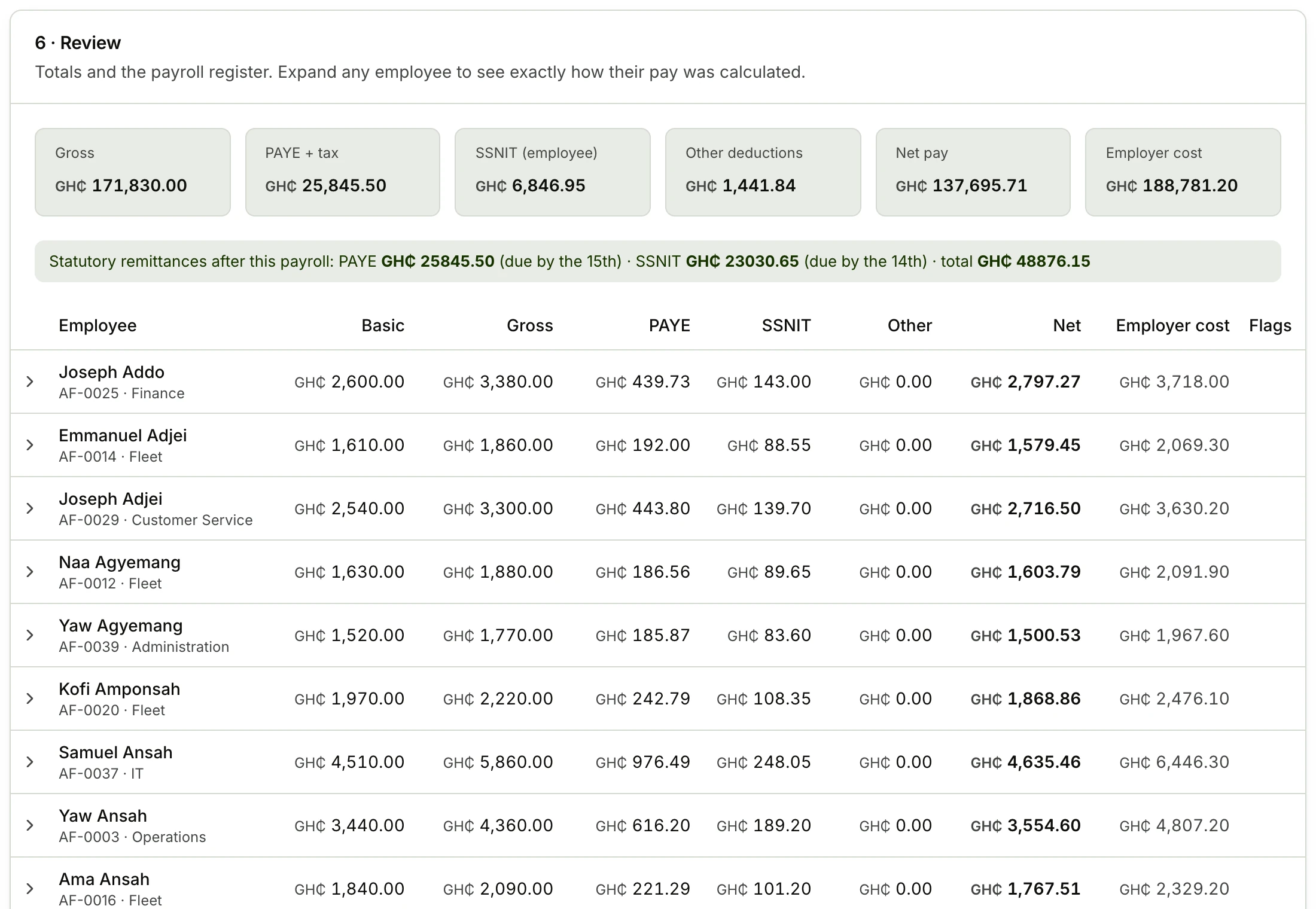
- 01Open the periodAugust 2026 opens against last month's closing figures.
- 02Confirm the peopleJoiners, leavers and salary changes since the last run.
- 03Pull attendanceApproved overtime, absences and unpaid days.
- 04Add the one-offsBonuses, allowances, deductions that apply this month only.
- 05Apply loan instalmentsOutstanding staff loans and advances, balances carried.
- 06CalculateThe engine runs every employee and records its working.
- 07Clear exceptionsBlocking issues stop the run; warnings need a decision.
- 08Review the registerEvery employee, expandable to the line-by-line calculation.
- 09ApproveA second pair of eyes. The rule version is pinned here.
- 10Pay and closeBank and MoMo schedules out, payslips issued, period closed.
Know who turned up, before payday.
Lateness, early departure and absence are worked out against each employee's own schedule and Ghana's public holidays, rather than one office-wide start time. What payroll pays is what attendance recorded.
Approved leave writes attendance for you, and approved overtime carries into the run at your multipliers and the statutory concessionary rates.
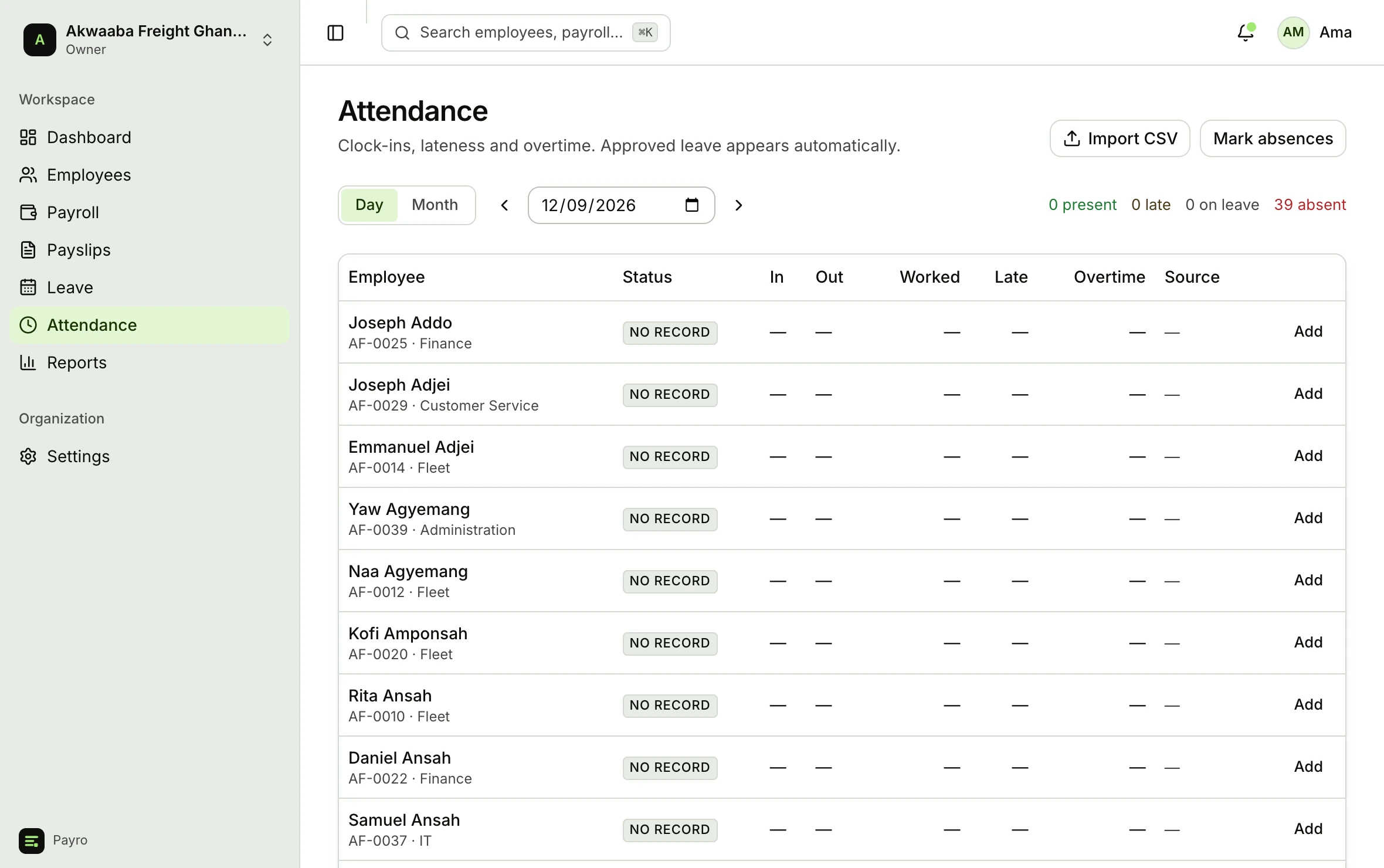
- Present, late, on leave, absent
- The day view answers it at a glance, with minutes late and hours worked per person.
- Clock in from a phone
- Employees clock in and out themselves on mobile web. There is no terminal to buy and no app to install.
- Or import it
- Bring a CSV from an existing device, or feed a terminal straight in through a token-authenticated endpoint.
- Corrections are auditable
- A manager can adjust any record, but it takes a written reason and lands in the append-only audit log.
Know where they clocked in from.
Employees clock in on their phones. Put your branches on the map, and Payro checks the phone's location against the branch every time. You choose one of three settings for the whole organisation, with a radius per branch.
Don't check location
Clock-ins are recorded without any location check. Nothing changes for your staff.
Default
Record where they clocked in
Everyone can still clock in from anywhere. Anyone outside their site is flagged for a manager, with the distance shown.
Only allow it at the site
A clock-in outside the branch radius, or with location switched off, is refused. The employee is told how far from the site they are.
A branch you haven’t placed on the map has no geofence, whatever the setting, so nobody is ever locked out because the site was not configured. Off-site clock-ins are flagged for a manager rather than hidden, and a manager can always record attendance by hand.
What you're holding when the month closes.
The documents the month has to produce, generated from the run that was approved.
PAYE due 15thSSNIT due 14thof the following month
Payslips
Every earning and deduction with the calculation behind each figure, as PDF, emailed and readable by the employee.
On approval
PAYE schedule
Tax per employee for the month, totalled for the GRA return.
Due 15th
SSNIT contribution schedule
Tier 1 and Tier 2 per employee against insurable earnings.
Due 14th
Bank transfer file
Net pay by bank, branch and account number, exported to CSV or Excel for you to submit to your bank.
Your pay date
Mobile money transfer file
Net pay by network and number for staff paid on MoMo, exported for your provider’s portal.
Your pay date
PAYE is due by the 15th and SSNIT by the 14th of the following month. Payro puts both dates on the schedule it hands you, so the deadline travels with the document. Payro produces these documents. It does not move money. You pay your staff and file your returns; Payro makes sure the figures are right.
The rest of the record, in the same place.
Payroll is only correct when the people data behind it is. All of it lives here, with an append-only audit log over every sensitive change.
Bank account, TIN and SSNIT numbers are encrypted at rest and shown only to the roles allowed to see them.
- Employees and structure
- Branches, departments and positions, with bank, TIN and SSNIT numbers encrypted at rest.
- Compensation history
- Salary changes are versions with effective dates, so a March payslip recomputes on March's salary.
- Leave
- Policies, accruals, carry-over and approvals. Approved leave writes attendance; unpaid leave reduces pay.
- Loans and advances
- Instalments deducted automatically until the balance clears.
- Reports
- Twenty reports, from employer cost and department cost to comparison, headcount and the statutory schedules, as CSV or Excel.
Priced by how many people you pay.
Every plan runs unlimited payrolls with the full statutory engine. What changes is headcount and the modules you switch on.
Every plan starts on a 14-day free trial. No card to begin, and your data is exportable if you leave.
- StarterUp to 10 employeesGH₵150/ month
- BusinessUp to 50 employeesGH₵450/ month
- ProfessionalUp to 150 employeesGH₵950/ month
- EnterpriseNo employee limitTalk to us
Run one month and compare it to your spreadsheet.
Import your staff, run August, and check every figure against what you would have paid. If the numbers don’t agree, we want to know why as much as you do.
- Free trialNo card to begin
- 14 days
- Rules appliedIn force since 1 September 2026
- GH-2026.2
- Payroll runsOn every plan, at every size
- Unlimited
- Your dataIncluding after you leave
- Exportable